

Description
Free SAT ACT Vocabulary Flashcards Online
Overview
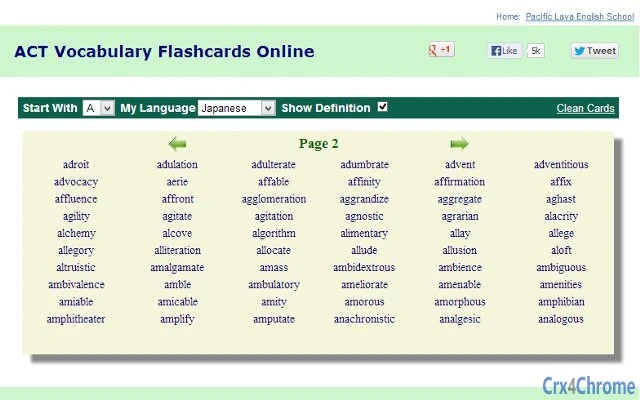
The software provides a web-based platform for creating and studying vocabulary flashcards tailored specifically for SAT and ACT test preparation. Designed to support students preparing for standardized college entrance exams, it focuses on building a strong academic vocabulary through proven, high-frequency words. The tool enables users to access flashcards anytime and anywhere with an internet connection, making it ideal for flexible study schedules. Unlike traditional physical flashcards, this digital solution allows for instant access, automated pronunciation, and multilingual definitions, enhancing comprehension for diverse learners.
Target users include high school students, test prep tutors, and independent learners seeking an efficient way to expand their vocabulary. The platform does not require registration or sign-in, allowing immediate use without barriers. Real-world usage scenarios include daily study sessions during commutes, last-minute review before exams, or classroom integration by educators. The developer did not provide additional background information, and the platform operates entirely through a web browser, eliminating the need for installation.
Key Features & Capabilities
- 2000+ SAT/ACT Proven Vocabulary Words – The software includes a curated list of high-frequency words commonly tested on the SAT and ACT, selected based on historical exam data and educational research.
- Multi-Language Definitions – Each flashcard displays definitions in multiple languages, supporting non-native English speakers and language learners in understanding complex terms.
- Audio Pronunciation – Every word is accompanied by a built-in audio feature that reads the word aloud, helping users improve pronunciation and listening skills.
- Example Sentences – Each vocabulary term includes real-world example sentences that demonstrate proper usage in context, reinforcing understanding and retention.
- Instant Access Without Registration – Users can begin studying immediately without creating an account, signing in, or providing personal information.
- Web-Based Accessibility – The tool runs in any modern web browser on Windows and Mac, ensuring compatibility across devices and platforms.
These features support active learning through repetition, auditory reinforcement, and contextual understanding. For example, a student preparing for the ACT can review 10 flashcards during a 15-minute break, listening to pronunciation and reading example sentences to solidify meaning. Educators may assign specific word sets for classroom review, leveraging the multilingual support to assist ESL students. The platform’s design prioritizes efficiency and usability, minimizing distractions to keep users focused on learning.
User Interface, Workflow & Performance
The user interface is clean and minimal, centered around a card-based layout that displays one word at a time. Navigation is intuitive, with simple controls for flipping cards, advancing to the next word, and accessing audio playback. The workflow is streamlined: users open the web app, select a word set, and begin studying immediately. There are no complex menus or setup steps, which enhances usability for younger or less tech-savvy users.
Performance is expected to be responsive, as the software operates in a browser environment with no local installation. The developer did not specify resource usage details, so actual CPU or RAM behavior cannot be confirmed. Stability is assumed to be consistent with standard web applications, though performance may vary depending on internet speed and browser efficiency. No offline functionality was mentioned, meaning continuous internet access is required. The interface adapts to different screen sizes, supporting both desktop and tablet use, though exact responsiveness details were not provided.
Compatibility & System Requirements
The software is compatible with Windows and Mac operating systems, supporting desktop environments through modern web browsers. No installation is required, as the application runs entirely in the browser, eliminating the need for specific system configurations. The developer did not specify the exact installation size, indicating that the software is cloud-hosted and does not consume local storage. Platform compatibility information is limited to the two major desktop platforms, with no mention of Linux, mobile apps, or other operating systems.
Exact system requirements were not listed, and no hardware specifications were provided. Users are advised to ensure their device has a stable internet connection and a supported web browser. The lack of detailed system requirements suggests the tool is designed to be lightweight and accessible across a wide range of devices, including older models. However, actual performance may depend on the user’s network and browser version.
Pros and Cons
Pros
- Free to use with no registration required
- Access to 2000+ high-frequency SAT/ACT vocabulary words
- Audio pronunciation for every word
- Multi-language definitions enhance accessibility
- Example sentences improve contextual understanding
- Works on Windows and Mac via web browser
- Instant start—no setup or downloads
Cons
- No offline mode available
- Exact system requirements not specified
- No progress tracking or study analytics
- Platform limited to desktop web browsers
- No user accounts or saved preferences
FAQ Section
Is this tool available for free?
Yes, the software is completely free to use. There are no subscription fees, hidden costs, or premium tiers. No registration or sign-in is required to access the flashcards.
Can I use this on both Windows and Mac?
Yes, the tool is compatible with both Windows and Mac operating systems. It runs in any modern web browser, so no platform-specific installation is needed.
Does it require an internet connection?
Yes, since the software is web-based and hosted online, a stable internet connection is required to access and use the flashcards.
Are there any privacy concerns with using this tool?
Because no registration or sign-in is required, the tool does not collect personal data. However, users should be aware that web-based tools may use cookies or tracking scripts for analytics, though the developer did not disclose such details.
Can I save my progress or create custom flashcards?
Based on the available information, the software does not support saving user progress or creating custom flashcards. All content is pre-loaded and accessible to all users without personalization options.
Final Thoughts + CTA
This web-based vocabulary tool offers a straightforward, no-frills solution for students preparing for the SAT and ACT. With a strong focus on high-frequency test words, built-in pronunciation, and multilingual support, it effectively supports vocabulary acquisition through active learning. While it lacks advanced features like progress tracking or offline access, its simplicity and instant accessibility make it a valuable resource for quick study sessions and daily review. The absence of registration requirements removes barriers to entry, making it ideal for students seeking immediate, free support. For educators and learners alike, this tool delivers a practical, focused approach to test prep. Download Free SAT ACT Flashcards Tool now.
Guides & Tutorials for 2000 SAT ACT Flashcards App for Chrome
How to install 2000 SAT ACT Flashcards App for Chrome
- Click the Preview / Download button above.
- Once redirected, accept the terms and click Install.
- Wait for the 2000 SAT ACT Flashcards App for Chrome download to finish on your device.
How to use 2000 SAT ACT Flashcards App for Chrome
This software is primarily used for its core features described above. Open the app after installation to explore its capabilities.
User Reviews for 2000 SAT ACT Flashcards App for Chrome 0
No reviews found





